
A fake Microsoft or Apple support call usually goes the same way: the caller says your computer has a virus, gets you to let them in with a remote access app, and then asks for money. Scammers also pretend to be your internet provider or even your own I.T. company, but Microsoft and Apple don’t make unsolicited calls to fix your computer. This guide shows the warning signs, what to do if you already let them in, and where to report it. (Phone numbers and screens shown are made-up examples.)
How the scam works
It starts with a scary call, and it always ends with them wanting into your computer, or your wallet.
How to spot a fake Microsoft or Apple support call: the warning signs
1Caller ID can be faked
Scammers can make any name or number show up on your phone, even a real company’s. “Microsoft Support” or “Apple Support” on the screen proves nothing.

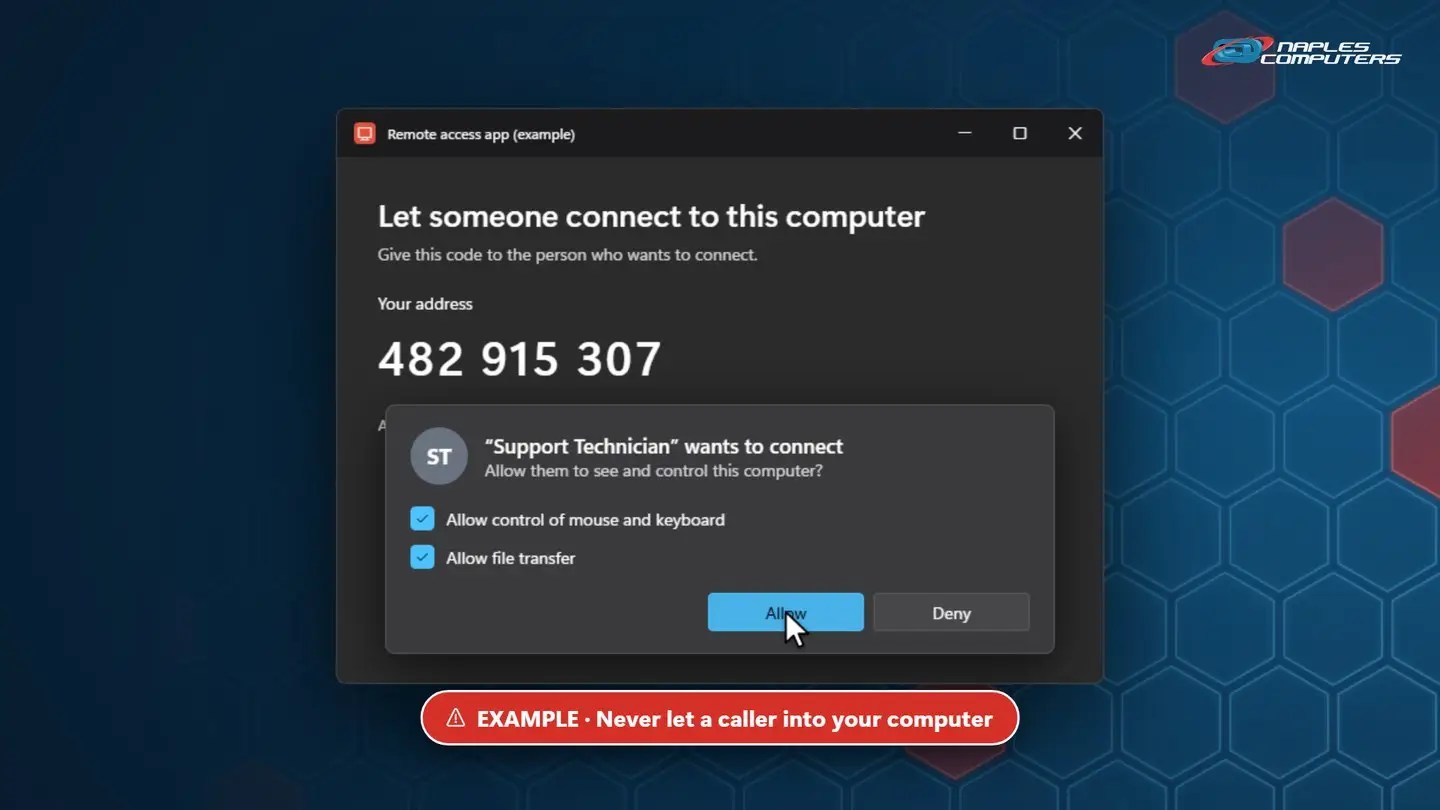
2Never give remote access to someone who called you
They’ll ask you to install a remote access app (like AnyDesk, TeamViewer or Quick Assist), read them a code, and click Allow. That gives a stranger full control of your computer.
Warning sign 3: they ask for money
- Gift cards — Any request to pay with gift cards, or read them the numbers on the back, is a scam. Every time.
- Refund scams — They say you were overcharged, “refund” too much, then beg you to send the difference back
- Your bank login — They ask you to sign in to your bank while they watch your screen
3 rules to remember
- Microsoft and Apple won’t call you — They don’t make unsolicited calls to fix your computer or ask for payment
- Never give remote access to a caller — Only let someone in if you called a company you trust, at a number you looked up
- Hang up, then call a number you know — From your bill, the company’s real website, or call us: 239-513-1960
Already let them in? Act fast.
- Hang up and disconnect from the internet — Turn off Wi-Fi or unplug the cable, so they can’t get back in
- Call your bank or card company — If you paid or shared account details. Paid with gift cards? Call the card company right away.
- Change your passwords on another device — Start with email and banking, and turn on two-step verification
- Call Naples Computers: 239-513-1960 — We’ll remove the remote access app and any malware, and check your computer
Report it, and warn others
- ReportFraud.ftc.gov — Tell the Federal Trade Commission. Reports help law enforcement stop scammers.
- microsoft.com/reportascam — Report scammers pretending to be Microsoft
- Warn family and friends — Scammers often target older relatives. Share this video with them.
At work? Verify every “I.T.” call.
- Call back on a number you already have — Scammers pretend to be your I.T. company, a vendor, or the help desk
- Train your staff — Everyone should know: no remote access for unexpected callers
- Know how your I.T. provider works — Naples Computers never calls out of the blue to get on your computer. Managed Services maintenance is arranged in advance.
Recap: spot a fake Microsoft or Apple support call
- Caller ID can be faked
- Microsoft and Apple won’t call to fix your computer
- Never give remote access to a caller
- Gift cards? It’s a scam. Every time.
Printable quick guide
Frequently asked questions
Does Microsoft or Apple ever call you about a virus?
No. Microsoft and Apple don’t make unsolicited calls to fix your computer or ask for payment. Caller ID showing “Microsoft Support” or “Apple Support” proves nothing, because it can be faked. Just hang up.
What should I do if I gave a scammer remote access?
Hang up and disconnect from the internet right away. If you paid or shared account details, call your bank or card company. Change your passwords from another device, starting with email and banking, then call Naples Computers at 239-513-1960 so we can remove the remote access app and any malware.
How do I report a fake Microsoft or Apple support call?
Report it to the Federal Trade Commission at ReportFraud.ftc.gov, and report scammers pretending to be Microsoft at microsoft.com/reportascam. Then warn family and friends: scammers often target older relatives.
How can I tell if a call from my I.T. company is real?
Hang up and call back on a number you already have, not one the caller gives you. Naples Computers never calls out of the blue asking to get on your computer: our remote sessions are always scheduled or started by you.
Related guides
- What to do when a pop-up says your computer is infected
- How to get remote help on a Mac (the safe way)
- Virus and malware removal
Source: Protect yourself from tech support scams (Microsoft Support)