
Deleted an email by mistake? It’s usually still recoverable. This guide shows how to get it back in Outlook (Deleted Items, and Recover Deleted Items for anything gone further than that, or even a deleted folder) and Gmail (Trash), plus why you should act within about 30 days.
Where does a deleted email go?
It doesn’t vanish right away — it just moves.
How to recover a deleted email: step by step
1Outlook: check Deleted Items first
Click Deleted Items in the folder list, and find the message.

2Outlook: gone from Deleted Items too? Recover Deleted Items
Right-click Deleted Items, and choose Recover Deleted Items. You’ll see older messages, and even a deleted folder, like “Old Projects”.

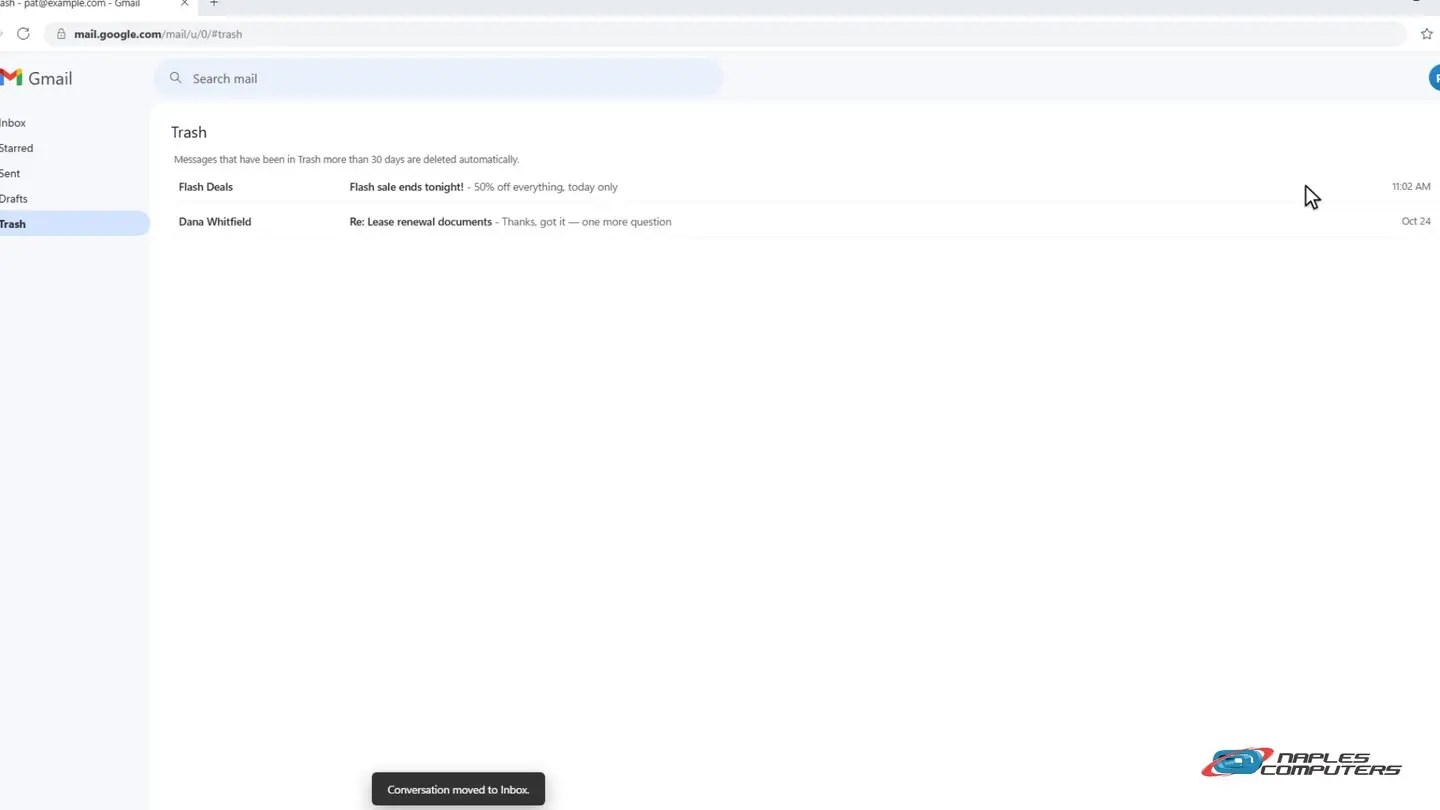
3Gmail: open Trash, and move it back
In the left sidebar, click Trash, and find the message.
A few tips
- The sooner, the better — Both Outlook and Gmail usually give you about 30 days before it’s gone for good.
- Can’t find it? Search — Search All Mail or All Folders — it might have been moved by a rule or filter instead.
- Still stuck? We can help — For a business mailbox, an admin may be able to recover it even after that window closes.
Recap: recover a deleted email
- Outlook: Deleted Items → right-click → Move to Inbox
- Gone from there too? Right-click Deleted Items → Recover Deleted Items
- Gmail: Trash → Move to Inbox
- Act within about 30 days
Printable quick guide
Frequently asked questions
How long do I have to recover a deleted email?
Usually about 30 days from when it was deleted, in both Outlook and Gmail, though the exact window can vary by account type. The sooner you look, the better your chances.
I emptied Deleted Items — is the email really gone?
Not necessarily, in Outlook. Right-click Deleted Items and choose Recover Deleted Items: it often shows messages (and sometimes whole folders) for a while after they leave Deleted Items.
Can I recover a deleted folder, not just an email?
In Outlook, yes — a deleted folder can show up in Recover Deleted Items the same way a deleted message does, as long as it’s within the recovery window.
Gmail says the message isn’t in Trash anymore. Now what?
Once a message has been in Gmail’s Trash more than 30 days, or is deleted a second time, it generally can’t be recovered from the Gmail web interface. For a Google Workspace business account, an administrator may still be able to recover it.
Related guides
- Mailbox full? Archive old email and free up space in Outlook
- What to do if your email was hacked
- Back up your important files
Source: Recover deleted items in Outlook (Microsoft Support)